Chapter 0: What is MNELAB?
This is a short, guide-like companion to the MNE-Python track in this repository — not a fourth independent track alongside Brainstorm and EEGLAB & ERPLAB. MNELAB is a graphical interface built directly on top of MNE-Python itself, so instead of teaching a separate tool, these chapters walk through the same load → preprocess → ICA → events/epochs → ERP workflow the main track already teaches, but by clicking through menus instead of writing code. It assumes you've read at least the main track's EEG Fundamentals and MNE Core Concepts chapters.
MNELAB in one paragraph
MNELAB is a free, open-source, cross-platform graphical user interface for MNE-Python, created by Clemens Brunner and published in the Journal of Open Source Software in 2022. Drag a recording onto its main window and it imports the file, shows you its channels, duration, and sampling rate, and lets you filter, re-reference, run ICA, edit events and annotations, epoch the data, and plot evoked responses — all through menus, all without writing a line of code. Every one of those menu items is a thin wrapper around an ordinary MNE-Python function or method call.
Why a companion, not a fourth track
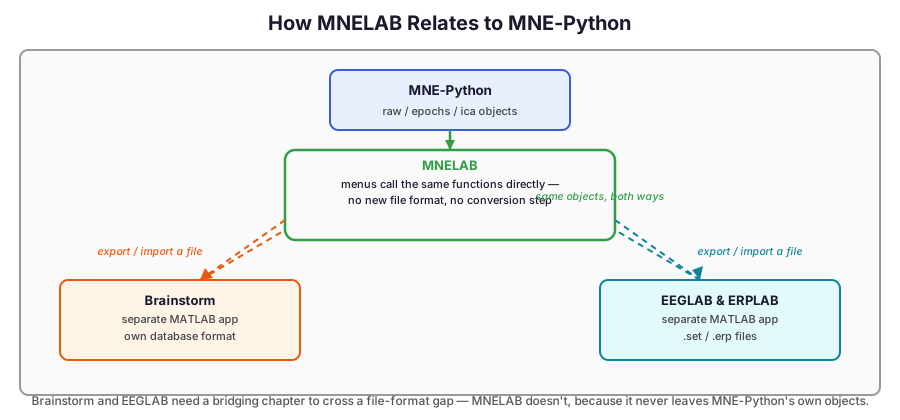
Brainstorm and EEGLAB & ERPLAB are separate applications with their own file formats — using them alongside MNE-Python means exporting and importing files across a real format boundary, which is why each of those tracks ends with a dedicated "bridging back to MNE-Python" chapter. MNELAB has no such boundary to cross: it opens and saves the same file formats MNE-Python already reads and writes, and internally it is MNE-Python — the same Raw, Epochs, Evoked, and ICA objects from Chapters 2–7 of the main track, just manipulated by clicking instead of typing. That is why this content lives inside the MNE-Python track rather than beside it.
Where this fits next to Brainstorm and EEGLAB & ERPLAB
| MNE-Python | MNELAB | Brainstorm | EEGLAB + ERPLAB | |
|---|---|---|---|---|
| Interface | Python code | GUI, over MNE-Python | GUI | GUI |
| Requires | Python | Python (installs as a small app) | Nothing (standalone) or MATLAB | MATLAB, or EEGLAB's standalone runtime |
| Underlying data | — | the exact same MNE-Python objects | its own database format | .set/.fdt, .erp |
| Best for | Reproducible scripts, full flexibility | A quick first look, or learning the MNE-Python API by watching it get generated | 3D source localization | ERP measurement at scale, plugin ecosystem |
MNELAB is not trying to replace writing MNE-Python code — its own author describes the goal as supplementing it. It's most useful for a fast exploratory look at a new recording, or as a way to discover which MNE-Python function corresponds to an action you already know how to do with your mouse.
What this companion guide covers
Eight short chapters, reusing the exact workflow and terminology from the main MNE-Python track:
| # | Chapter |
|---|---|
| 0 | What is MNELAB? |
| 1 | Installation and First Launch |
| 2 | Loading and Inspecting Data |
| 3 | Preprocessing — Filtering and Referencing |
| 4 | Artifact Removal with ICA |
| 5 | Events and Epoching |
| 6 | ERP Analysis |
| 7 | From Menu to Script: The History Panel |
Like the Brainstorm and EEGLAB & ERPLAB tracks, these chapters contain markdown explanation only — MNELAB is a GUI application, not a library, so there's no code to execute here.